
How to Choose the Right Website Features for Your Business
- 21 Sep 2026
- By Arman Raya
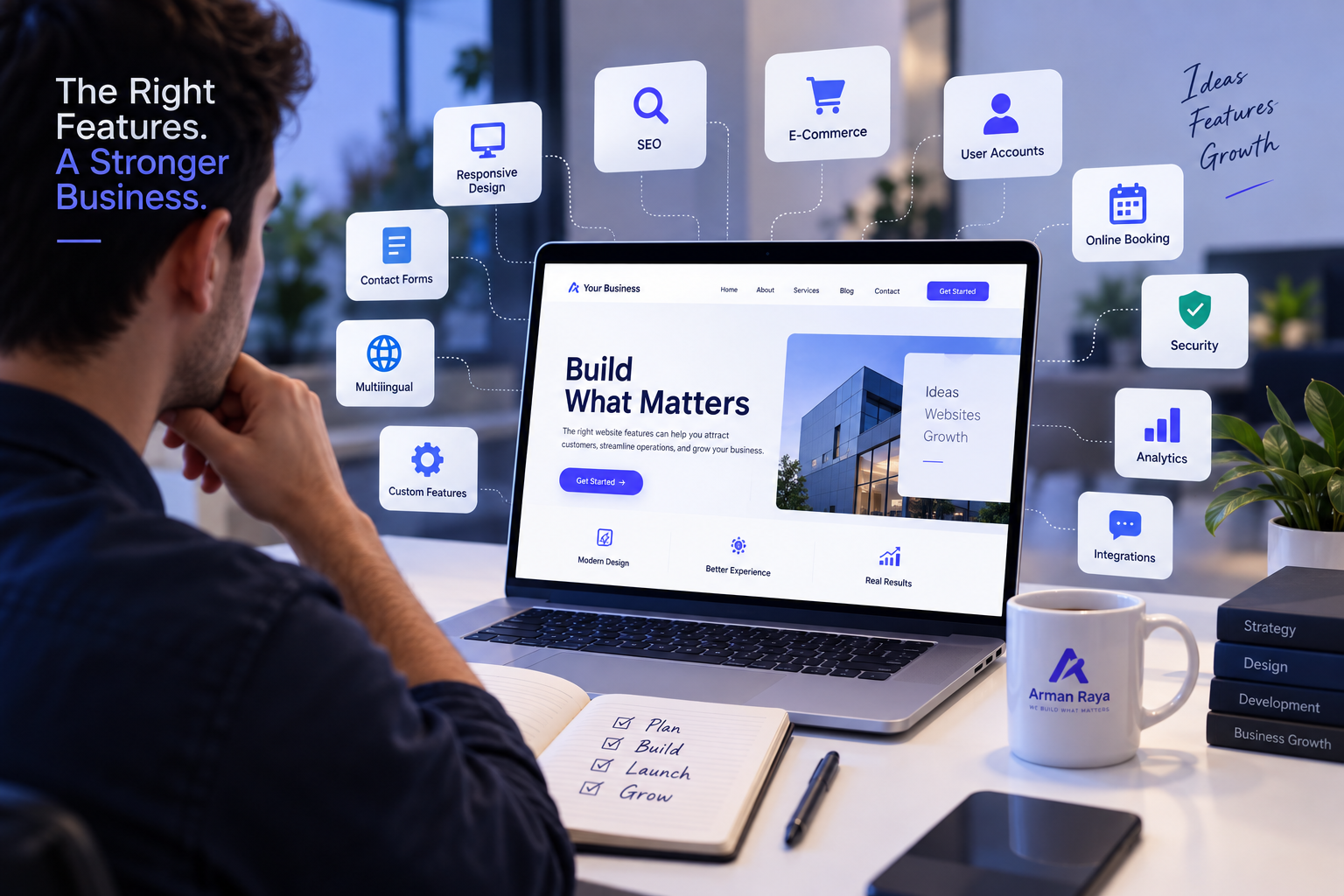
A professional website is more than just an attractive design. It is a digital tool that should help your business attract visitors, build trust, generate leads, sell products or services, and make everyday operations easier.
A professional website is more than just an attractive design. It is a digital tool that should help your business attract visitors, build trust, generate leads, sell products or services, and make everyday operations easier.
One of the biggest mistakes businesses make when developing a website is adding too many features without considering whether those features actually serve a purpose. A website does not become better simply because it has more functionality. The right website features are the ones that support your business goals and provide real value to your customers.
Whether you are launching a new website or planning to redesign an existing one, choosing the right features can have a major impact on its performance and long-term success.
In this guide, we will explain how to identify the most important website features for your business and how to decide which functionality you actually need.
1. Start With Your Business Goals
Before choosing website features, define what you want your website to accomplish.
Different businesses have different objectives. A construction company may primarily want to generate project inquiries, while an online store needs product browsing and secure payments. A real estate company may need property listings and search functionality, while a professional consultant may focus on appointment bookings and lead generation.
Ask yourself:
- Do I want to generate more leads?
- Do I want customers to purchase products online?
- Do I need online booking or appointments?
- Do I want to showcase my portfolio or previous projects?
- Do customers need to create accounts?
- Do I need to provide information or educational content?
- Do I need an online dashboard?
- Do I need to connect the website to other business systems?
Your answers should determine the features you build.
The goal is simple: choose features based on business objectives, not trends.
2. Understand What Your Customers Need
Your website should be designed around the people who will use it.
Think about the typical journey of your customer. What information are they looking for? What questions do they have? What action do you want them to take?
For example, if you run a service-based business, visitors may want to:
- Learn about your services.
- See examples of your previous work.
- Read reviews or testimonials.
- Understand your pricing or request a quotation.
- Contact your team.
In this case, a clear service structure, portfolio, testimonials, contact form, and call-to-action buttons may be more valuable than complex functionality.
Understanding your customers helps you avoid spending time and money on features that nobody actually uses.
3. Essential Features Every Business Website Should Have
Although every website is different, some features are fundamental to almost every professional business website.
Responsive Design
Your website should work properly on desktops, tablets, and smartphones.
Mobile responsiveness is no longer an optional feature. Customers expect websites to be easy to navigate regardless of the device they use.
Clear Navigation
Visitors should be able to find important information quickly.
A well-organized navigation system should make it easy to access pages such as:
- Home
- About
- Services
- Portfolio
- Blog
- Contact
Depending on the business, additional sections may be required.
Contact Forms
A professional contact form makes it easier for visitors to communicate with your business.
You can create different forms depending on your goals, such as:
- General inquiries
- Request a quotation
- Project consultation
- Support requests
- Appointment requests
Strong Calls to Action
Every important page should guide visitors toward the next step.
Examples include:
- Request a Quote
- Book a Consultation
- Contact Us
- Start Your Project
- Shop Now
- Schedule an Appointment
Effective calls to action help turn website visitors into potential customers.
Search Engine Optimization
Your website should be technically and structurally prepared for search engines.
Important SEO considerations include:
- Proper page structure
- SEO-friendly URLs
- Meta titles and descriptions
- Optimized headings
- Image optimization
- Internal linking
- Structured content
- Fast loading performance
SEO should be considered during development rather than added as an afterthought.
Website Analytics
Analytics can help you understand how visitors interact with your website.
You can learn:
- Which pages receive the most traffic
- Where visitors come from
- Which pages generate leads
- How users navigate your website
- Which marketing channels perform best
Data can help you make better decisions about future improvements.
4. Consider Advanced Features for Growing Businesses
Once the essential foundation is established, your business may benefit from more advanced functionality.
Customer Accounts
If customers need to access personal information, orders, invoices, documents, or services, a secure customer account system can provide a much better experience.
Online Booking
Businesses such as consultants, clinics, agencies, salons, and professional services can benefit from online appointment systems.
Customers can select an available date and time without having to contact the business manually.
Online Payments
If your business sells products, services, subscriptions, or bookings online, payment integration can simplify the purchasing process.
Depending on your business model, you may need:
- Credit/debit card payments
- Online payment gateways
- Subscription payments
- Invoices
- Order management
E-Commerce
An online store requires more than simply displaying products.
Important e-commerce features may include:
- Product categories
- Product search
- Filters
- Shopping cart
- Checkout
- Customer accounts
- Payment processing
- Order management
- Inventory management
- Discount codes
The complexity of these features should match the size and requirements of your business.
Multilingual Support
If your business serves customers in multiple countries or language groups, multilingual functionality can significantly improve accessibility.
A multilingual website should be properly structured rather than simply translating visible text.
5. Do You Need a Custom Dashboard?
Some businesses require functionality that cannot be efficiently managed through a basic website.
For example, a company may need a dashboard where administrators can:
- Manage customers
- Manage products
- Track orders
- Manage invoices
- Review inquiries
- Publish content
- Manage employees
- Generate reports
- Monitor business activity
In these situations, a custom web application or management system may be more appropriate than a traditional brochure website.
Frameworks such as Django can be particularly useful for building secure, scalable, database-driven web applications with customized administrative functionality.
6. Integrations Can Make Your Website More Powerful
Your website does not necessarily have to work as an isolated system.
It can communicate with other tools and services used by your business.
Depending on your requirements, you may need integrations with:
- CRM systems
- Email marketing platforms
- Payment gateways
- Accounting software
- Shipping systems
- Social media platforms
- Analytics tools
- Maps
- Calendar systems
- Customer support platforms
Integrations can reduce manual work and help create a more connected business workflow.
7. Don't Add Features Just Because They Are Popular
One of the most important principles of website development is that more features do not automatically mean a better website.
For example, a small consulting business may not need:
- A complicated customer dashboard
- An advanced e-commerce system
- Dozens of filters
- Complex animations
- Multiple unnecessary integrations
Adding unnecessary functionality can increase development costs, maintenance requirements, security risks, and page complexity.
Instead, ask one question about every proposed feature:
"What business problem does this feature solve?"
If the answer is unclear, the feature may not be necessary.
8. Prioritize Features Based on Business Value
A useful way to plan your website is to divide features into three groups.
Must-Have Features
These are essential for launching the website.
Examples:
- Responsive design
- Service pages
- Contact form
- SEO foundation
- Secure hosting
- Analytics
- Clear navigation
Important Features
These improve functionality and customer experience.
Examples:
- Online booking
- Customer accounts
- Advanced forms
- Search
- Multilingual support
- Payment integration
Future Features
These can be added after the initial launch.
Examples:
- Advanced dashboards
- Mobile applications
- AI-powered functionality
- Complex automation
- Advanced reporting
- Third-party integrations
This approach allows you to launch a strong website without unnecessarily increasing the initial development scope.
9. Think About Scalability
Your website should not only work for your business today. Ideally, it should be able to grow with you.
For example, you might start with ten products but eventually have hundreds. You might initially receive a few inquiries per week but later need a complete CRM workflow.
When planning your website, consider:
- Will the database need to grow?
- Will more users need access?
- Will you add new services?
- Will you need additional languages?
- Could you introduce online payments later?
- Will you need a customer portal?
- Could the website eventually become a web application?
Planning for scalability early can reduce the cost and complexity of future development.
10. Security Should Be a Core Feature
Security should not be treated as an optional addition.
Depending on the website, security requirements may include:
- HTTPS/SSL
- Secure authentication
- Strong password policies
- Role-based permissions
- Input validation
- Protection against common web attacks
- Secure payment processing
- Regular updates
- Automated backups
- Monitoring and logging
Websites that store customer information or process payments require particular attention to security.
11. Performance Matters Too
A feature-rich website can become slow if it is not properly developed.
Images, animations, scripts, third-party services, plugins, and poorly optimized code can all affect performance.
When choosing features, consider their potential impact on:
- Page loading time
- Mobile performance
- Server resources
- User experience
- Search engine performance
A professional website should balance functionality with performance.
12. Website Features Should Support Your Marketing Strategy
Your website should work together with your marketing efforts.
For example, if your main marketing strategy is SEO, your website should support content creation, landing pages, internal linking, and analytics.
If you generate leads through social media, landing pages and optimized inquiry forms may be important.
If you use Google Ads, dedicated landing pages and conversion tracking can help measure campaign performance.
Your website should therefore be considered part of your overall digital marketing system—not simply an online business card.
13. Build for the Future, Not Just for Launch Day
A website launch is the beginning of your digital presence, not the end.
After launch, you can analyze user behavior and identify which features are actually providing value.
You may discover that customers frequently use your contact form but rarely use another feature. This information can help you prioritize future improvements.
A good website development strategy is therefore iterative:
Plan → Build → Launch → Measure → Improve
This allows your website to evolve based on real customer behavior.
Conclusion
Choosing the right website features starts with understanding your business, your customers, and your long-term goals.
A successful website does not need every possible feature. It needs the right combination of functionality, usability, performance, security, and scalability.
Start with the features that directly support your business objectives. Build a strong foundation, measure how visitors interact with your website, and gradually introduce advanced functionality when it provides real value.
Whether you need a professional company website, e-commerce platform, custom dashboard, customer portal, or a fully customized web application, the right technology and feature set can turn your website into a powerful business tool.
At Arman Raya, we focus on building websites and web applications around the specific goals and requirements of each business—combining modern design, reliable development, performance, security, and scalable functionality.
- Tags:
- Professional Website Features
- Website Functionality
- Custom Web Development
More Related Articles
Explore more insights on design, development, SEO, and digital products from the Arman Raya team.

AI in Web Development: How AI Is Changi…
- 30 Sep 2026
- By Arman Raya
Website Maintenance: Why Launching Your…
- 30 Jun 2026
- By Arman Raya

How to Build Customer Trust on Your Web…
- 14 Jun 2026
- By Arman Raya

Why Doesn’t Your Website Generate Sales?
- 28 May 2026
- By Arman Raya

Comprehensive Guide to Designing Educat…
- 26 May 2026
- By Arman Raya

Lawyer Website Design with the Django F…
- 24 May 2026
- By Arman Raya

On-Page SEO vs. Off-Page SEO: What’s th…
- 21 May 2026
- By Arman Raya
Restaurant Website Design and Online Me…
- 20 May 2026
- By Arman Raya